
The Git Trick That Will Attract Recruiters 🚀
Don't let an "empty" Github contribution graph cost you an interview.


Before I start, happy new year to you and your families🎉.
New year, new goals, new job listings…, and I want to make sure you are ready for them 🎯
The Problem: The “Invisible” Work 👻
I was scrolling through LinkedIn recently and noticed:
many job descriptions ask for an "active GitHub account".
Recruiters often use that green contribution graph as a quick "pulse check" to see if a candidate "loves writing code 🧑💻"
But here is the reality: many of us work for companies that use Azure DevOps, Bitbucket, or internal GitLab instances (I know the pain 🤮). You might be writing high-quality code for 8+ hours a day, but because it’s not on your personal GitHub account, your profile looks like a The Upside Down from stranger things 😈.
When a company has hundreds of candidates to screen, an empty graph might be the reason you may not pass the initial screening phase 😞
Let’s make our commit Graph Greener 🟩
Disclaimer: Please don’t tell recruiters about this 😅
Make a private repository on Github and clone it locally.
Open terminal and make your first commit (e.g on january first of 2025)
git commit --date=1735689600 -m "⏮️⏰"
(* The magic number is the timestamp 👆)
Yea that’s it, now if you “git log” you will see a commit on 01/01/2025, congrats 👏 Well now you know what’s the next step, just iterate step 2 with different timestamp 🔁
Once you finish, push the changes. and enjoy an increased interview success rate.
My best friend Claude Code already create a simple script that you can find in the end of this article (anthropic ❤️)
Bonus Points: The Artist’s Touch 🎨
For the creative people in our community, you can take this even further. By precisely timing your commits, you can actually "draw" on your contribution graph or even spell out your name. It’s a fancy way to impress someone 🚀
For doing that I recommend using this open source-library.
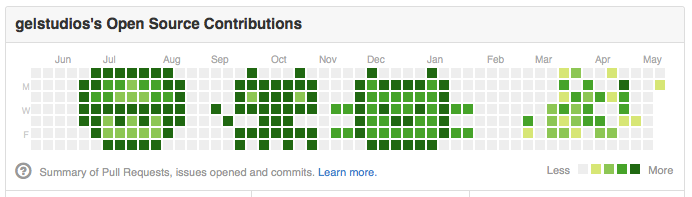
Let’s be realistic 🦉
Now that I drew your attention about git, let’s be honest, git is a power-tool.
If you don't know how to handle a rebase, fix a conflict, or manage a new release, your "green graph" is a lie that will be exposed in the first week of your new job.
In the upcoming post I will share with you some of my must-have git commands that everyone should know.
Let’s make our profiles look pro, but let’s make our skills undeniable 💪
Konstantinos Nikoloutsos
| #!/bin/bash | |
| # Starting timestamp: January 1, 2025 00:00:00 UTC | |
| start_timestamp=1735689600 | |
| # Ending timestamp: January 1, 2026 00:00:00 UTC | |
| end_timestamp=1767225600 | |
| # Current timestamp | |
| current=$start_timestamp | |
| # Counter for commit messages | |
| counter=1 | |
| # Loop through timestamps | |
| while [ $current -le $end_timestamp ]; do | |
| # Create a dummy change | |
| echo "Commit $counter at timestamp $current" >> activity.txt | |
| # Stage the change | |
| git add activity.txt | |
| # Commit with custom date | |
| git commit --date=$current -m "Activity commit #$counter" | |
| echo "Created commit #$counter for timestamp $current" | |
| # Generate random increment between 0.6 and 2 days in seconds | |
| # 0.6 days = 51840 seconds | |
| # 2 days = 172800 seconds | |
| # Range = 172800 - 51840 = 120960 seconds | |
| random_increment=$((51840 + RANDOM % 120961)) | |
| # Increment timestamp by random amount | |
| current=$((current + random_increment)) | |
| counter=$((counter + 1)) | |
| done | |
| echo "Done! Created $((counter - 1)) commits" | |
| echo "Run 'git push' to push to your repository" |